




 UltraEdit
 Visual Studio
 Antigravity
 Docker
 Portfolio
 Dreamweaver
 Parallels
 Access
-
Latest Version
Postman 12.20.1 LATEST
-
Review by
-
Operating System
macOS 10.12 Sierra or later
-
User Rating
Click to vote -
Author / Product
-
Filename
Postman for macOS (x64).zip
-
MD5 Checksum
9ffec7a8acf904ae39ee76efec59f4ce
We recommend the free Postman App for Mac ,Windows , Linux or Chrome. Millions of developers and thousands of companies worldwide use this app to support their API development.
Shouldn’t you? The program doesn’t require learning a new language, complicated UI, or new workflows. Developers can start using the tool immediately to make API development faster & easier. Download the Postman for macOS app. It's free!
Features and Highlights
A Complete Toolchain for API Development
The app was designed from the ground up, to support all aspects of API development. The software's apps are built on a single underlying layer, ensuring consistent performance and user experience.
Mirrors Your Existing API Development Workflow
This product has features for every API developer: request building, tests & pre-request scripts, variables, environments, and request descriptions, designed to work seamlessly together. The program was designed to make your current workflow faster and better.
Built on the Postman App You Know
Post man Pro expands the toolchain of the App, used by 3+ million developers worldwide. Same user-friendly interface, built on a single underlying technology layer for robust performance.
Collaboration, API Documentation, API Monitoring
Features for the power API developer, including better collaboration, customizable web-viewable Documentation, and API Monitoring, customized to your own the app Collections.
Individuals, Small Teams, and Large Teams
Postman Pro is currently used by individual developers, as well as developer teams ranging in size from 2 to 200+. Teams working QA, DevOps, front-end & back-end development, and API publishing use Pro to ensure a simple and effective API experience.
How to Use
- Install Postman by dragging it to Applications
- Launch Postman and sign in or create an account
- Create a new request from the workspace
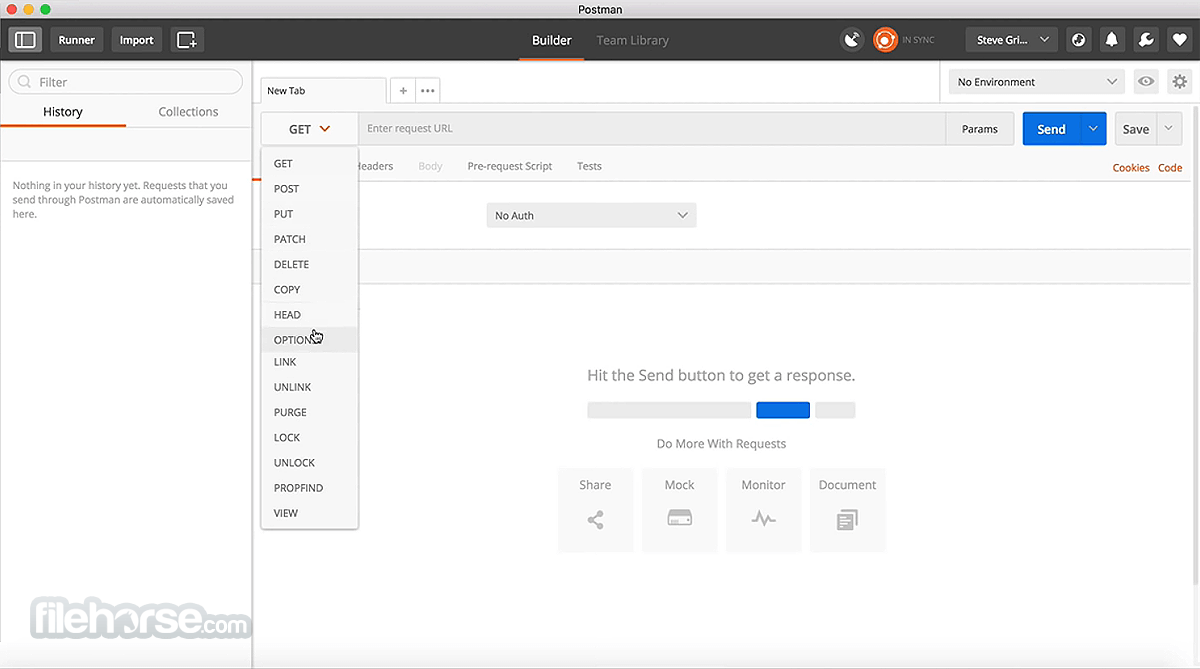
- Set the request method (GET, POST, etc.)
- Enter the API endpoint URL
- Add headers, params, or body as needed
- Click "Send" to execute the request
- View the response in the lower panel
- Use collections to organize your API requests
- Save requests for reuse and collaboration
- Explore APIs using the built-in API network
- Automate tests using the Tests tab
- Monitor APIs with scheduled monitors
- Use environments to manage variables
- Generate code snippets for API calls
- Collaborate with teams using shared workspaces
- Debug using console and logs
- Mock APIs for testing without backend
- Manage APIs with built-in version control
FREE ($0)
- For up to 3 collaborators.
- Includes API Client access, cloud-based integrations, 3 packages, 1-day collection recovery, 25 collection runs, access to Flows, and 50 free Postbot activities.
- Add-ons: Postbot, Collection Runner, Flows.
- All Free features + unlimited collaborators, 30-day collection recovery, 10,000 mock server & monitor requests, and pay-as-you-go capabilities.
- Add-ons: Postbot, Collection Runner, Flows.
- All Basic features + private workspaces, single/multi-partner workspaces, basic role-based access, 25 packages, and 90-day collection recovery.
- Add-ons: Postbot, Collection Runner, Partner Editor, Flows.
- All Professional features + private API network, SSO/SCIM/SAML, reporting & analytics, audit logs, user groups, advanced role-based access, 100 packages, 100,000 mock server requests, 10,000 monitor requests, and customer success.
- Add-ons: Postbot, Collection Runner, Partner Editor, API Builder, Advanced Security Administration.
macOS 10.13 (High Sierra) or later
Intel or Apple Silicon (M1/M2) processor
Minimum 4 GB RAM
At least 500 MB free disk space
Internet connection for sync and updates
PROS
- Easy-to-use interface
- Powerful API testing features
- Excellent collaboration tools
- Support for automation and scripting
- Works offline after initial setup
- Can be resource-intensive
- Learning curve for advanced tools
- Team features locked behind paywall
- Sync issues occasionally occur
- Limited CLI support on macOS
Also Available: Download Postman for Windows
-
Postman 12.20.1 Screenshots
The images below have been resized. Click on them to view the screenshots in full size.
-

-

What's new in this version:
Code mocks are now available in Cloud View:
Available as a beta feature:
- Code mocks let you simulate APIs using custom JavaScript request handlers and response logic. You can now create and run code mock servers in Cloud View, making it easier to develop, test, and share API simulations with your teammates.
- Code mocks in Cloud View receive a unique URL and are always available to handle requests. If you’re on a paid plan, you can also deploy a local code mock as a mock server, turning it into a cloud-hosted service your team can send requests to at any time. By default, cloud code mock servers are private and can only be accessed by workspace members or callers that provide a valid Postman API key.
Simulations are now available in Cloud View:
- With Postman Simulator, you can now create and run simulations in Cloud View. Simulations let you apply conditions such as response delays, rate limits, and error responses across one or more code mocks, making it easier to test how applications behave under real-world conditions.
Track your interactions with the Postman Browser Tool:
- The Postman Browser Tool now records your interactions with a page as you browse. In the Interactions tab, you can review each event. This includes who drove it (Agent Mode or you), the action type, the Playwright locator used to identify the element, and the time since the previous interaction. You can also ask Agent Mode to generate Playwright tests or API requests and tests based on your recorded activity.
Improved:
Keep code mocks in sync with collections and specifications:
- When you create a code mock from a collection or API specification, you can now choose to keep it synchronized with the source. Changes to the collection or specification are automatically reflected in the code mock.
Inspect and debug state in code mocks:
- Code mocks now include improved state management and debugging tools. You can configure state sessions and inspect pm.state values to better understand and troubleshoot stateful behavior.
Use packages in code mocks:
- You can now use packages in your code mock implementations, making it easier to reuse code and extend mock server functionality. Code mock servers support packages from the Package Library and external registries.
More ways to access code mocks in simulations:
- With Postman Simulator, you can now choose how requests access code mocks in a simulation. Use a URL path or request header to specify which mock server should handle a request.
- These options make it easier to integrate simulations into different testing and development workflows
- To learn more, see Simulate real-world conditions in Postman
Manage public code mock servers:
- Team Admins can now control whether code mock servers can be made public and require approval before a public code mock server is published
 OperaOpera 133.0 Build 5932.60
 PhotoshopAdobe Photoshop CC 2026 27.8
 OKXOKX - Buy Bitcoin or Ethereum
 WPS OfficeWPS Office
 Adobe AcrobatAdobe Acrobat Pro 2026.001.21691
 CleamioCleamio 3.4.0
 MalwarebytesMalwarebytes 5.24.0
 TradingViewTradingView - Track All Markets
 CleanMyMacCleanMyMac X 5.2.10
 AdGuard VPNAdGuard VPN for Mac 2.9.0
Comments and User Reviews