




 EaseUS Video
 Paragon ExtFS
 CloudMounter
 FileZilla
 AirRadar
 NTFS for Mac
 StreamFab
 Commander
-
Latest Version
Transmission 4.13 LATEST
-
Review by
-
Operating System
macOS 11.0 Big Sur or later
-
User Rating
Click to vote -
Author / Product
-
Filename
Transmission-4.1.3.dmg
-
MD5 Checksum
02d37015b9ed09d97dd50bab75f33bc4
Transmission for Mac is a free and easy-to-use BitTorrent client software that is focused on enabling even novice users to enter into the world of Torrents without any need to invest time in learning how to configure client.
It automatically watches over your preferred directories, blocks bad peers, and has a very intuitive web interface that can be accessed from any internet enabled device.
In addition to this, advanced users will appreciate inclusion of full and secure encryption, peer exchange, webseeds, automatic port forwarding, tracker editing, file selection, and comprehensive speed limits for both torrents and global download.
This all means that immediately after starting this app for the first time, both novices and professionals can easily manage their online sharing and control all aspects of file transferring.
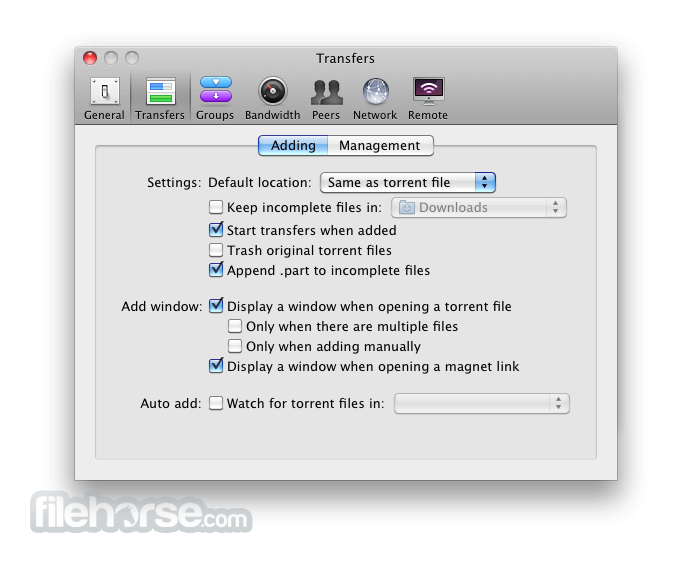
Main dashboard of Transmission features very simple interface, with all the basic tools for managing currently active transfers. Customization screen offers controls for changing both surface and deep features, with dozens of tools that are separated in seven main configuration categories – General, Transfers, Groups, Bandwidth, Peers, Network and Remote.
With support from open source community who produced countless updated to this program since its inception, Transmission for macOS represents one of the best made BitTorrent clients on the market today.
In addition to Mac, it can also be used natively on GTK+ and Qt GUI clients. Another important fact of the app operation is that require very little processing resources (less than majority of its competitors) which make it perfect companion to every Mac user who wants to share and receive data using BitTorrent protocol.
How to Use
Is Transmission free to use?
Yes, Transmission is completely free and open-source software, available under the MIT license. You can download it from the official website: transmissionbt.com.
What platforms does Transmission support?
Transmission is cross-platform and supports various operating systems, including macOS, Linux (with GTK+ and Qt interfaces), Windows, FreeBSD, OpenBSD, NetBSD, and even embedded systems like NAS devices and routers.
Does Transmission offer a web interface for remote management?
Yes, Transmission includes a built-in web interface that allows users to manage their torrents remotely through a web browser. This feature is particularly useful for controlling downloads on headless servers or network-attached storage devices.
What features does Transmission offer?
Transmission provides a range of features, including encryption support, download scheduling, remote management, IP filtering, support for magnet links, and the ability to prioritize files within torrents. It also supports multiple trackers, peer exchange, and has a minimalistic user interface.
Is Transmission still actively developed?
Yes, Transmission is actively maintained and developed. The latest stable release is version 4.0.6, which includes various improvements and bug fixes. You can find the source code and contribute to the project on GitHub.
System Requirements
It automatically watches over your preferred directories, blocks bad peers, and has a very intuitive web interface that can be accessed from any internet enabled device.
In addition to this, advanced users will appreciate inclusion of full and secure encryption, peer exchange, webseeds, automatic port forwarding, tracker editing, file selection, and comprehensive speed limits for both torrents and global download.
This all means that immediately after starting this app for the first time, both novices and professionals can easily manage their online sharing and control all aspects of file transferring.
Main dashboard of Transmission features very simple interface, with all the basic tools for managing currently active transfers. Customization screen offers controls for changing both surface and deep features, with dozens of tools that are separated in seven main configuration categories – General, Transfers, Groups, Bandwidth, Peers, Network and Remote.
With support from open source community who produced countless updated to this program since its inception, Transmission for macOS represents one of the best made BitTorrent clients on the market today.
In addition to Mac, it can also be used natively on GTK+ and Qt GUI clients. Another important fact of the app operation is that require very little processing resources (less than majority of its competitors) which make it perfect companion to every Mac user who wants to share and receive data using BitTorrent protocol.
How to Use
- Install it by dragging to the Applications folder
- Launch Transmission from Applications
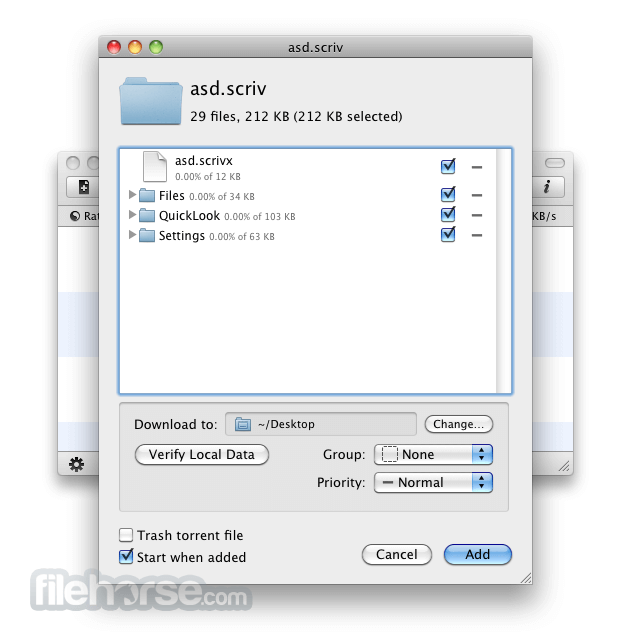
- Drag and drop .torrent files into the window
- Set download location and preferences
- Monitor progress in the main interface
- Pause, resume, or remove torrents anytime
- Configure bandwidth limits and queue settings
- Enable encryption in preferences if needed
- Close the app when downloads are complete
Is Transmission free to use?
Yes, Transmission is completely free and open-source software, available under the MIT license. You can download it from the official website: transmissionbt.com.
What platforms does Transmission support?
Transmission is cross-platform and supports various operating systems, including macOS, Linux (with GTK+ and Qt interfaces), Windows, FreeBSD, OpenBSD, NetBSD, and even embedded systems like NAS devices and routers.
Does Transmission offer a web interface for remote management?
Yes, Transmission includes a built-in web interface that allows users to manage their torrents remotely through a web browser. This feature is particularly useful for controlling downloads on headless servers or network-attached storage devices.
What features does Transmission offer?
Transmission provides a range of features, including encryption support, download scheduling, remote management, IP filtering, support for magnet links, and the ability to prioritize files within torrents. It also supports multiple trackers, peer exchange, and has a minimalistic user interface.
Is Transmission still actively developed?
Yes, Transmission is actively maintained and developed. The latest stable release is version 4.0.6, which includes various improvements and bug fixes. You can find the source code and contribute to the project on GitHub.
System Requirements
- macOS 10.10 (Yosemite) or later
- 64-bit Intel or Apple Silicon processor
- At least 50 MB of free disk space
- Internet connection for torrent downloads
- Optional: firewall permissions for incoming connections
- Lightweight and fast performance
- Open-source and ad-free
- Simple and clean user interface
- Low CPU and memory usage
- Supports magnet links and encryption
- Limited advanced torrent features
- No built-in search engine
- Minimalist interface may feel too basic
- No integrated media player
- Fewer customization options than competitors
Why is this app published on FileHorse? (More info)
-
Transmission 4.13 Screenshots
The images below have been resized. Click on them to view the screenshots in full size.

-
-

-
-

What's new in this version:
Fixed:
- a CORS bug that leaked the anti-CSRF nonce
- a use-after-free bug in peer code
- build error when compiling with fmt 12.2.0
 OperaOpera 134.0 Build 5954.46
 PhotoshopAdobe Photoshop CC 2026 27.9.1
 OKXOKX - Buy Bitcoin or Ethereum
 WPS OfficeWPS Office
 Adobe AcrobatAdobe Acrobat Pro 2026.001.21771
 CleamioCleamio 3.4.0
 MalwarebytesMalwarebytes 5.25.2
 TradingViewTradingView - Track All Markets
 CleanMyMacCleanMyMac X 5.2.10
 AdGuard VPNAdGuard VPN for Mac 2.9.0
Comments and User Reviews