




 UltraEdit
 Antigravity
 Parallels
 Dreamweaver
 Visual Studio
 Access
 Portfolio
 Docker
-
Latest Version
BBEdit 16.0.2 LATEST
-
Review by
-
Operating System
macOS 12.0 Monterey or later
-
User Rating
Click to vote -
Author / Product
-
Filename
BBEdit_16.0.2.dmg
Specifically crafted in response to the needs of Web authors and software developers, this award-winning product provides an abundance of high-performance features for editing, searching, and manipulation of text.
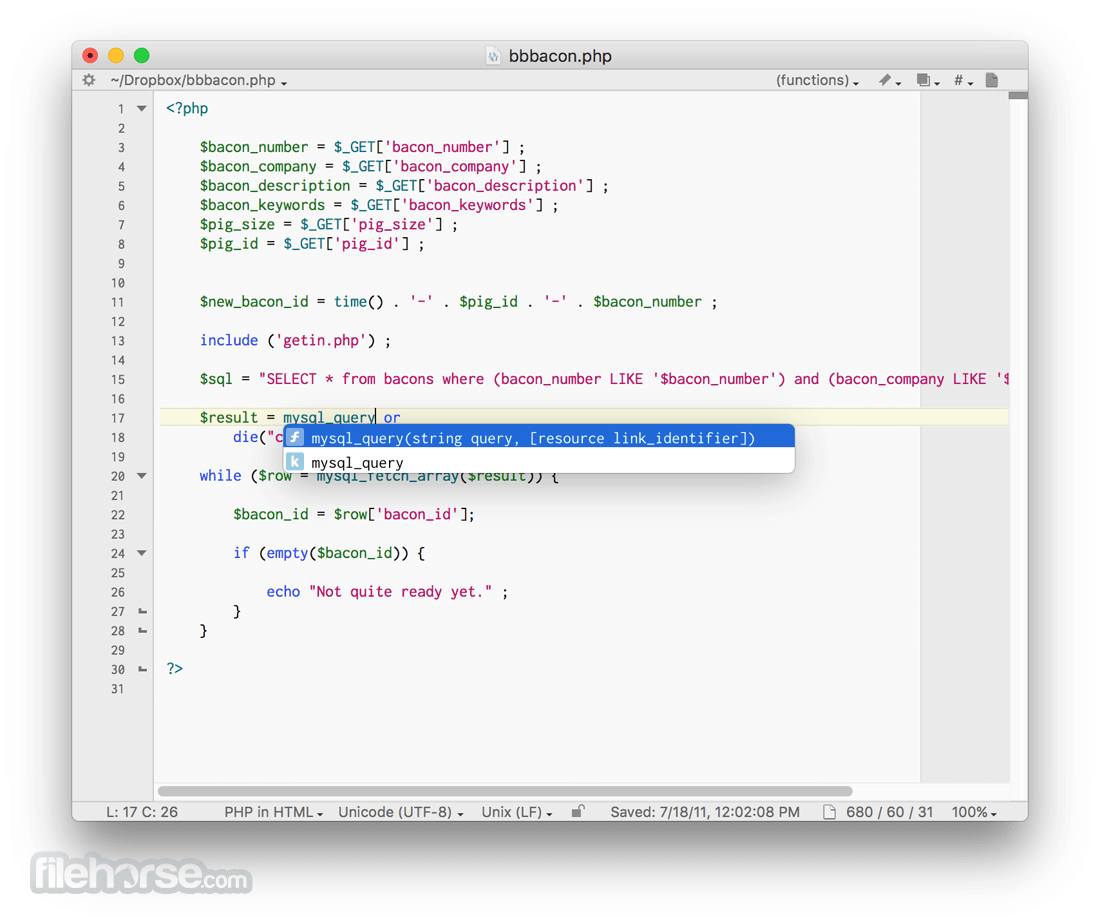
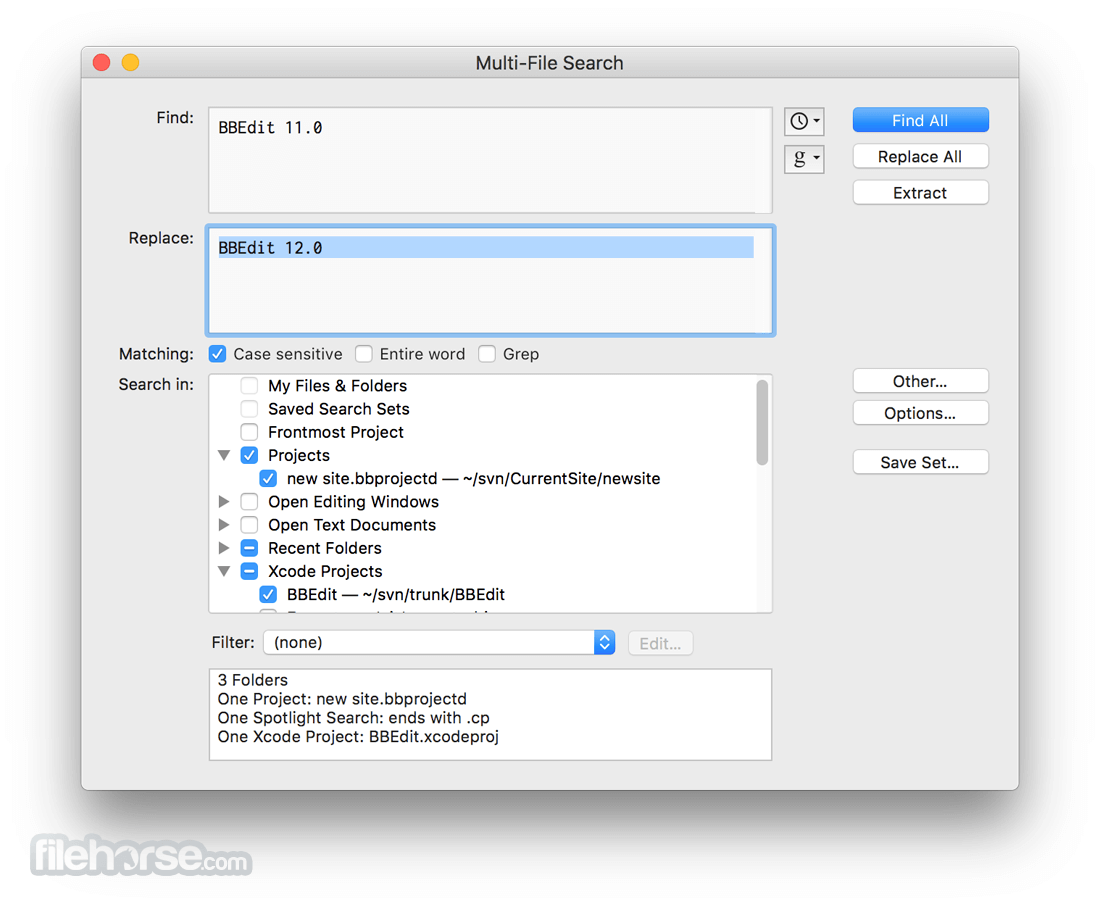
An intelligent interface provides easy access to BBEdit’s best-of-class features, including grep pattern matching, search and replace across multiple files, project definition tools, function navigation and syntax coloring for numerous source code languages, code folding, FTP and SFTP open and save, AppleScript, macOS Unix scripting support, text and code completion, and of course a complete set of robust HTML markup tools.
Features and Highlights
Text Factories
Text Factories increase your productivity by making it possible to quickly and easily apply as many of BBEdit’s powerful arsenal of tools as you need to achieve your goals across multiple files and folders, with just the single initial setup required. As a bonus, text factories operate in the background, allowing you to use the app for other work while they’re running, and take full advantage of machines with multiple processors.
Codeless Language Modules
Codeless language modules make it much easier to extend BBEdit’s built-in syntax coloring and function navigation. The basic syntax and coloring rules for programming languages can be represented by a relatively simple text file, without requiring programming or advanced logic.
Terminal Integration
Invoke BBEdit from the command line and pass the results to a document. For example, the ps (process status) command can generate some extremely long lines. Here, we are telling ps to give complete details and to put the result into a new document and to scroll the window to the top of the document. (The document behind the Terminal window is a BBEdit document.)
Organize your projects
You can also add files from anywhere (on disk, or from FTP/SFTP) to a BBEdit Project (and save the Project for reuse). While the Disk Browser and FTP/SFTP Browser windows show you the structure of your volumes, the app Projects let you easily access related files without them having to be located together.
Automator Support
BBEdit for macOS includes a set of Automator actions that mirrors its internal text transformations; most of what is on the Text menu is available to Automator, as well as a “Replace All” action for search and replace; and a few supporting actions to smooth the process of getting text into and out of open the tool documents. No scripting required!
Improved syntax coloring
The internal syntax coloring mechanics have been extensively reworked, allowing for a much greater selection of core color types, and now allowing language modules to add their own color types. Support for color schemes has been expanded, and several factory color schemes are included.
New Clippings system mechanics
The Clippings system (used for creating, managing, and applying frequently used "snippets" of text) is now even more powerful and flexible. Any clipping set can be made available universally or on a per-language basis (for any desired set of languages). The Clippings palette, text completion system, and the "Insert Clipping" command have been extended to support this additional flexibility.
New UI for Find Differences
The "Find Differences" dialog box has been modernized, and folder comparisons are faster than ever, thanks to a rewritten and newly performance-tuned comparison engine. The most significant changes are in the results interface, however: an all-new single window presentation is much easier to use for folder comparisons, is easier to manage, and (for folder comparisons) provides the ability to copy files as needed from one folder to another.
How to Use
- Install and launch BBEdit on your Mac
- Open or create a new text or code file
- Use syntax highlighting for supported languages
- Search and replace with advanced grep tools
- Use projects to organize multiple files
- Preview HTML files in the built-in browser
- Access scripts and automation via AppleScript
- Customize settings and preferences to your needs
- Save and export your work as needed
macOS 10.15.4 or later (Catalina and up)
Intel or Apple Silicon Mac
50MB of available disk space
Internet connection for updates
Administrator privileges for installation
PROS
- Fast performance with large files
- Powerful search and replace tools
- Supports many programming languages
- Highly customizable interface
- Reliable and stable for daily use
- No built-in terminal support
- Lacks Git integration features
- Interface may feel outdated
- Free version has feature limits
- No Windows or Linux version
-
BBEdit 16.0.2 Screenshots
The images below have been resized. Click on them to view the screenshots in full size.
-

-
-

-

What's new in this version:
Fixed:
- Fixed crash or other misbehavior which would occur when an SFTP connection failed due to host key mismatch, port number misuse (pro tip: port 21 is for FTP, port 22 is for SFTP, and FTP and SFTP are not related in any way other than sharing three letters), or other exceptional conditions
- Corrected a behavior regression in which new documents could be created in the active project/instaproject, rather than in a new window or in the first available non-project window (depending on settings)
- Fixed bug in which global disablement of LSP semantic token coloring wasn’t respected
- Fixed bug in which Prefix/Suffix Lines mishandled partial-line selection ranges
- Allow Command-delete as a synonym for “Don’t Save” in the “do you want to save changes to this document” close alert
- Fixed crash that would occur when closing the Find window in the (very short) time interval during which it was waiting to update live match state
- Fixed crash that would occur when closing a document at the same time a clock change, time zone change, or day change notification was received in the application
- Fixed crash which could be caused by immediately closing an FTP browser or project window immediately (in a very narrow time window) after opening it
- Made a change to address a rare reported crash
- Made a change to address a reported sporadic crash which would occur when loading a file
- Made changes to resolve a potential race condition that could cause the minimap to crash sporadically
- Fixed a potential crash which could occur while quitting, when an open window was blocked by a window-modal sheet
- Fixed an obscure crash which could occur if a document was closed while waiting for the application to finish restoring its soft wrap and selection state (if it had been soft wrapped)
- Fixed crash that would occur while checking links in a file and the project site settings didn’t specify a server URL or directory
- Function scanning in codeless language modules once again considers text in comments; this had changed (intentionally) for 16.0, but there were unintended consequences for some language module developers
- Improved reporting of Git merge conflicts in the working copy status
- Fixed bug in which site deployment would silently do nothing if the local content root wasn’t in a Git repository
- Fixed an ancient lurking horror involving leading slashes in SFTP server paths
- Fixed a bug in which certain character sequences in DefaultKeyBindings.dict weren’t interpreted correctly
- Corrected several behaviors in vi emulation involving Visual mode and word-oriented editing. Visual e now extends the selection through the final character of the word; iw is now recognized for inner-word selections and operator commands such as viw, diw, and ciw; and s now substitutes the current character or selection and enters Insert mode
- Fixed misplacement of the insertion point after zero-length LSP edits occurring during certain completions
- Made a change to prevent a race deadlock when checking the modification date of a remote file before saving it
- Fix a crash which could occur in the Find window when dismissing it via a Return key in the search text box, and an error (such as a malformed Grep pattern) occurred in the process
- Fixed insertion point misplacement when using G in vi mode in soft wrapped documents
- Made a change to resolve a Shell Worksheet behavior issue when sending very large command strings to the shell
- Fixed regression in which the legacy “Keyword Pattern” codeless language module key was not loaded or validated
- Corrected title of the “Show in Finder” entry in the Menus & Shortcuts settings
- Fixed regression in which Unix shell script coloring would get confused by things that looked like they might have been regular expressions, but weren’t
- Corrected behavior of line-oriented commands in vi mode
- Corrected misbehavior of counted dd, cc, and yy in vi mode, in which the range of lines affected always started at BOF
- Implemented { and } for paragraph movement in vi mode
- Corrected the font attributes returned by requests from the accessibility API to include a correct specification of the font, as well as the prevailing foreground color
- Corrected calculations for text range boundaries requested via the accessibility API when Soft Wrap Text was turned on
- Return the actual effective font size via the accessibility API, rather than relying on the client to determine magnification
- Corrected behavior of o/O in vi mode
- Fixed bug in which blockquote markers were not colored correctly for successive blockquote runs in Markdown documents
- Corrected handling of unexpected response block types in Anthropic API responses
- Improved correctness of vi word motion and insertion placement when exiting visual mode
- Removed the vestigial “Remove” item from the context menu in the custom language settings list
- Corrected selection/cursor behavior when using t and friends in vi mode
- Corrected coloring while editing in files backed by some codeless language modules
- Corrected behavior of a in vi mode when used at end-of-line
- Corrected behavior of screen-movement keys in vi mode
- Corrected appearance of the “exchange find and replace field contents” button in the Find and Multi-File Search windows when running on macOS 14
 OperaOpera 134.0 Build 5954.56
 PhotoshopAdobe Photoshop CC 2026 27.9.1
 OKXOKX - Buy Bitcoin or Ethereum
 WPS OfficeWPS Office
 Adobe AcrobatAdobe Acrobat Pro 2026.001.21789
 CleamioCleamio 3.4.0
 MalwarebytesMalwarebytes 5.25.2
 TradingViewTradingView - Track All Markets
 CleanMyMacCleanMyMac X 5.2.10
 AdGuard VPNAdGuard VPN for Mac 2.9.0
Comments and User Reviews