




 Tungsten PDF
 Adobe Sign
 PDFelement
 Trade Ideas
 Swift
Swift
-
Latest Version
Ultimaker Cura 5.13.0 LATEST
-
Review by
-
Operating System
macOS 10.12 Sierra or later
-
User Rating
Click to vote -
Author / Product
-
Filename
UltiMaker-Cura-5.13.0-macos-X64.dmg
The app is designed to be easy to use, even for those with limited experience in 3D printing, and offers a range of features that make it simple to prepare and print 3D models.
This software is well known as one of the best tools for businesses that use 3D printing as part of their daily workflow, offering them extensive stability and security features.
Additionally, the app integrates with a range of other tools and software, making it easy to incorporate into existing workflows. This includes full support for CAD project imports/exports and compatibility with various 3D model and photo file formats such as STL, OBJ, X3D, 3MF, BMP, GIF, JPG, and PNG.
Developers of this app are also makers of a wide array of hardware solutions for 3D printing, providing comprehensive offerings for 3D printing, model preparation, material management, and finalization of projects of all types and sizes.
Key Features
- Expert Slicing Engine – Manage 3D printing projects of all types and sizes with automated preparation tools.
- Customization Options – Test over 400 settings for fine-tuning 3D models.
- Integration with 3D Printers – Send projects seamlessly to a wide range of 3D printers.
- Material Profiles – Access a large offering of material profiles and find the perfect filament for a specific build.
- CAD Plugin Integration – Integrates with a range of CAD software, including SolidWorks, Siemens NX, Autodesk Inventor, and others.
- Cross-Platform Support – Optimized for Intel and M-series Macs, Windows, and Linux computers.
This open-source application is available as a completely free product, enabling users on all modern computer platforms to easily deploy it at home, school, or business.
To get it up and running, users only need to download the official installer from its main website or secure FileHorse servers, and drag the app’s icon to the Application folder. This will initiate an automated installation procedure, after which users will be able to jump into the app.
It is important to note that owners of the Ultimaker 3D printers can also download the app of the same name from the App Store (for Macs, iPads, iPhones, and Apple Vision), which will manage all detected printers from this company.
How to Use
Using this app is straightforward. New and seasoned users can import their 3D models into the app and then use the various customization options to fine-tune their printing experience.
The app offers a range of tutorials and guides that can help users get started, and the user interface is designed to be easy to navigate.
User Interface
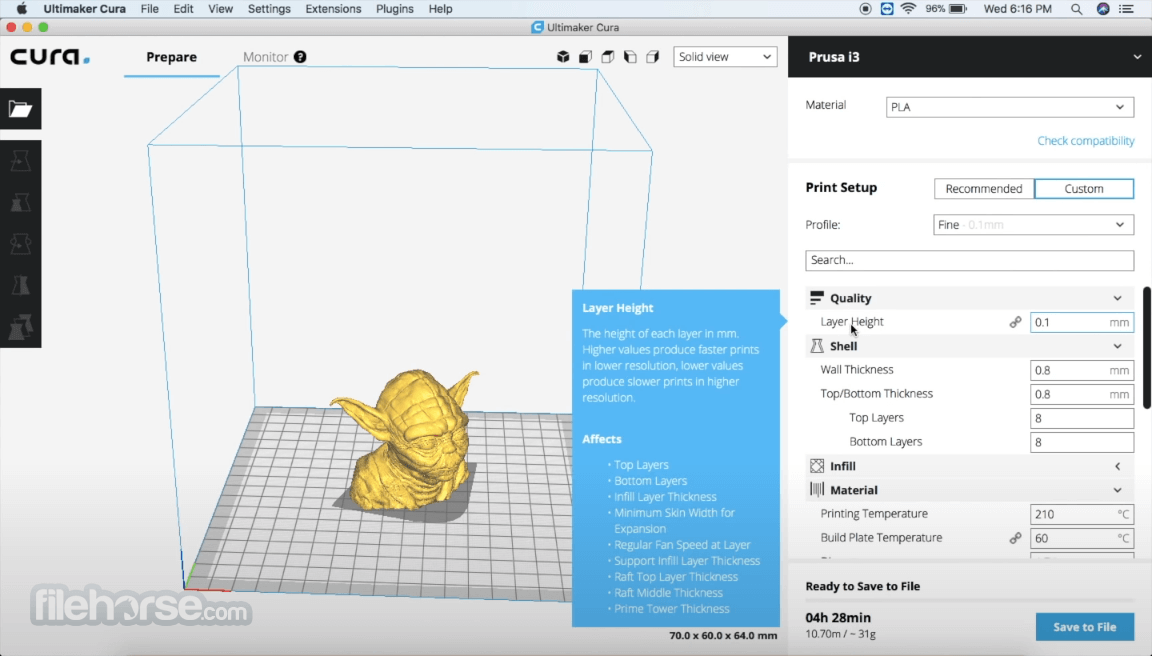
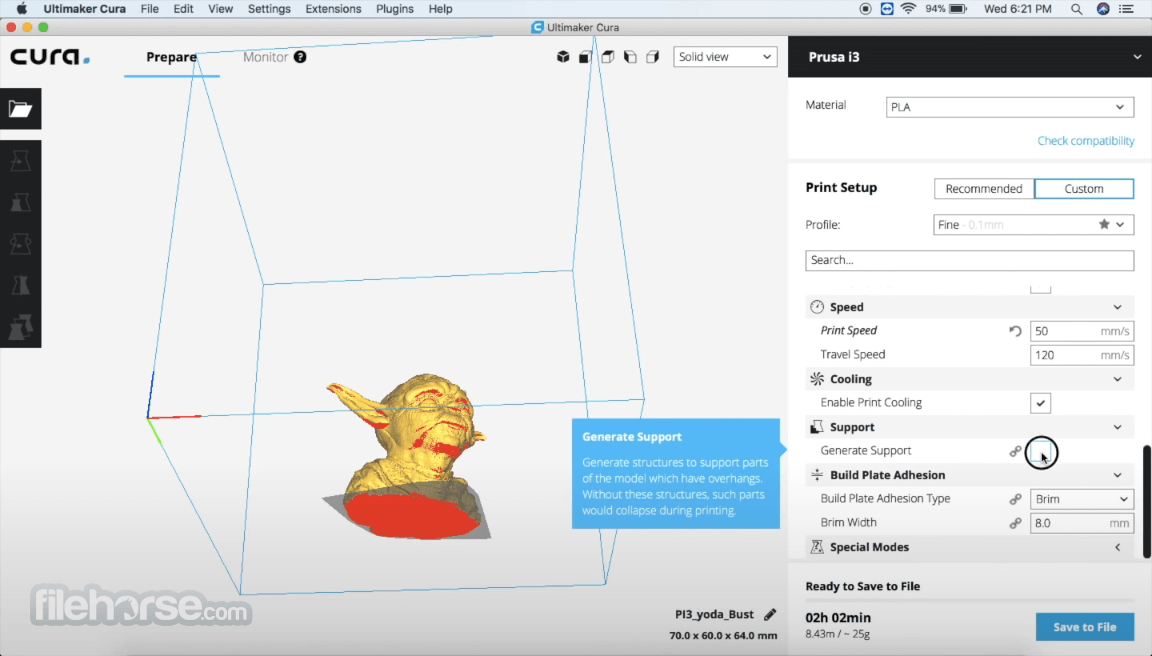
The Ultimaker Cura interface is clean and intuitive, with a layout that makes it easy to navigate the app's various features. The main window displays a summary of the user's 3D model, and users can access the app's customization options through a series of tabs and menus.
In addition to Mac UI options, this app also features native mobile apps that are fully streamlined for touch-friendly operations and 3D model management.
FAQ
What is Ultimaker Cura?
It is a fully featured 3D printing software that allows users to fine-tune their 3D models and print them with ease.
Is it safe?
Yes, this open-source app is regarded as one of the safest and most reliable software solutions for 3D printing.
Alternatives
CuraEngine – A reliable tool for converting 3D models into g-code instructions for 3D printers.
Slic3r – A free and open-source 3D printing software that can connect to a wide range of popular 3D printers.
Simplify3D – A professional-grade 3D printing software for enthusiasts and businesses.
Pricing
This is a free app.
System Requirements
- OS: macOS 10.12 or later
- CPU: Intel or M-series processor
- GPU: OpenGL 4.1 compatible graphics card
- RAM: 4GB of memory (8GB is recommended)
- Storage: 550 MB of free space
- Easy to use.
- Advanced slicing engine.
- Compatible with all modern 3D printers.
- Extensive customization options.
- Stylish user interface.
- Cross-platform availability.
- Integration with modern 3D model editors.
- Free for use.
- Limited options compared to competition.
- No support for 3D modeling.
Ultimaker Cura for Mac is a powerful and user-friendly 3D printing software designed to help anyone prepare and print 3D models.
While it may have some limitations, this app is an excellent choice for individuals and businesses that use 3D printing as a hobby or commercially.
Also Available: Download Cura for Windows
-
Ultimaker Cura 5.13.0 Screenshots
The images below have been resized. Click on them to view the screenshots in full size.

-
-
-

-

What's new in this version:
New features and improvements:
- Added the new UltiMaker Factor 4+ printer, including profiles
- Added option to specify file association during the installation of Cura for windows
New Settings:
- Introduced Infill Start/End Preference settings that give control over the starting location of infill
- Added Support Infill option "Lightning", and in addition the following supporting settings: Support Lightning Angle, Support Lightning Overhang Angle, Support Lightning Prune Angle, and Support Lightning Straightening Angle, which together allow you to add and control lightning infill generated for support structures
- The Support Infill Line Multiplier has been introduced to increase the quantity of infill lines. When an even number of lines is specified through this setting and paired with lightning support, it produces a single extrusion line for each island
- Introduced Minimum Hole Area in Brim Support, which filters out small holes in the support brim, resulting in a more consistent brim
- Added Temperature Delta Top Surface, which allows you to print top surfaces at a different temperature
- Added more options to Retract Before Outer Wall to give more control over retraction behavior when traveling to the outer wall
- Added Initial Layer Wall Ordering which gives control over the order in which the walls are printed for the initial layer
Fixed:
- Support blockers now function correctly even when assigned to a disabled extruder; they no longer cause slicing conflicts and continue to effectively block support
- Fixed an issue where thin support structures would be generated within tree support
- Fixed an issue where the tree support interface layer would be missing
- Randomized infill now also works for infill skin support
- Fixed an issue where Keep or Discard profile user preference would be ignored
- Overhanging wall speed was previously applied too aggressively, resulting in extremely slow printing in overhanging areas
- Travel speed was applied to layer switches, resulting in high-speed Z-travels
- Fixed an issue where certain 3MF files would incorrectly load with an invalid setting configuration
- Fixed an issue where certain setting combinations would skip parts of the skin and walls sections
- Resolved an issue where slicing would fail when both Raft build plate adhesion and Support Lightning Infill were enabled
- Fixed an issue where overhang speed would be applied inconsistently when both Split Infill and Overhang Speed settings were enabled
- Fixed an issue where the profile has changes notification would overlap with UI elements
- Fixed an issue where certain setting configurations would cause a large amount of small line segments to be generated for the prime tower
- Fixed an issue where clicking the "Sign in to Digital Factory" button twice would fail to log in
Printer definitions, profiles and materials:
- Updated high-speed S-Line profiles to improve tree support strength and improved seam behavior by ending infill close to the seam and traveling to the seam unretracted
- Improved material detection for Method line printers to automatically select support material for the raft interface
- Automatically disable Infill Skin Support if Gradual Infill Steps is enabled, since these are conflicting settings
 OperaOpera 134.0 Build 5954.26
 PhotoshopAdobe Photoshop CC 2026 27.8
 OKXOKX - Buy Bitcoin or Ethereum
 WPS OfficeWPS Office
 Adobe AcrobatAdobe Acrobat Pro 2026.001.21691
 CleamioCleamio 3.4.0
 MalwarebytesMalwarebytes 5.25.2
 TradingViewTradingView - Track All Markets
 CleanMyMacCleanMyMac X 5.2.10
 AdGuard VPNAdGuard VPN for Mac 2.9.0
Comments and User Reviews