




 Premiere Pro
 CapCut
 After Effects
 4K Video
 Filmora
 VideoPaw
 Restream
 Amazon Prime
-
Latest Version
Shotcut 26.8.1 LATEST
-
Review by
-
Operating System
Mac OS X 10.8 or later
-
User Rating
Click to vote -
Author / Product
-
Filename
shotcut-macos-26.8.1.dmg
Major features include support for a wide range of formats; no import required meaning native timeline editing; Blackmagic Design support for input and preview monitoring; and resolution support to 4k. Edit your videos using Shotcut for macOS comprehensive software!
Features
Wide Format Support
Supports hundreds of audio and video formats and codecs thanks to FFmpeg. No import required which means native editing, plus multi-format timelines, resolutions and frame-rates within a project. Frame accurate seeking supported for many video formats.
Device and Transport Options
Blackmagic Design SDI and HDMI for input and preview monitoring. Screen, webcam and audio capture. Network stream playback. Supports resolutions up to 4k and capture from SDI, HDMI, webcam, JACK & Pulse audio, IP stream, X11 screen and Mac DirectShow devices.
Sleek, Intuitive Interface
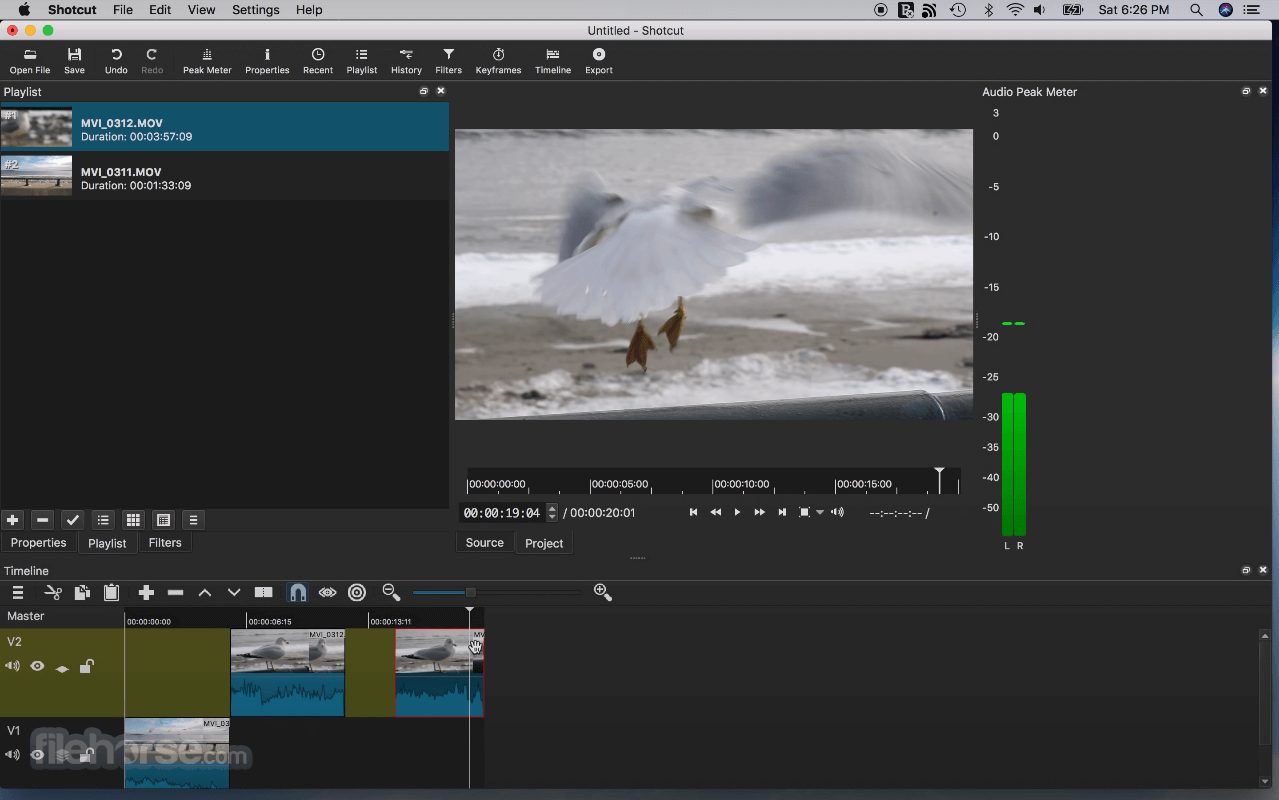
Multiple dockable and undockable panels, including detailed media properties, recent files with search, playlist with thumbnail view, filter panel, history view, encoding panel, jobs queue, and melted server and playlist. Also supports drag-n-drop of assets from file manager.
Alternatives
Movavi Video Editor – Intuitive with built-in effects.
Filmora – User-friendly with creative effects.
Adobe Premiere Pro – Industry-standard video editing.
iMovie – Free, easy-to-use, and great for beginners.
Final Cut Pro – Professional editing with advanced tools.
DaVinci Resolve – High-end editing with color grading.
HitFilm – VFX and editing in one package.
Lightworks – Pro-level editing with a free version.
How to Use
- Install by dragging it into the Applications folder
- Launch the app and set your video mode preferences
- Import media via drag-and-drop or the Open File menu
- Drag clips to the timeline to begin editing
- Use filters to adjust video, audio, and effects
- Cut, trim, and arrange clips directly on the timeline
- Export the final video using the Export panel
- Choose format, resolution, and encoding options
- Click Export File to render and save the project
macOS 10.14 Mojave or later
64-bit Intel or Apple Silicon processor
Minimum 4 GB RAM (8 GB or more recommended)
OpenGL 2.0 compatible GPU
At least 500 MB of free disk space
PROS
- Free and open-source software
- Wide format support without plugins
- Cross-platform project compatibility
- Customizable interface layout
- Frequent updates and active development
- Interface can feel cluttered
- No built-in templates or themes
- Limited advanced motion graphics tools
- Occasional performance lag on large projects
Also Available: Download Shotcut for Windows
-
Shotcut 26.8.1 Screenshots
The images below have been resized. Click on them to view the screenshots in full size.

-
-

-

-

What's new in this version:
Elements:
Added Elements panel to the File > New and View menus and the Generate buttons.
This is a very slim (22MB) stock asset library: emoji stickers, sounds, overlay transitions, animated text, graphics.
The content licenses are royalty free, including commercial, and do not require attribution:
- Emojis: Open Font License 1.1
- Sounds: The Sonniss #GameAudioGDC Bundle Licensing Agreement
- Text, Transitions, Graphics: Lottie Simple License
Changed:
- Added Settings > Graphics Adapter for Windows and Linux (only if multiple GPUs)
- Added Shake video filter
- First generated UI to be shared and officially adopted
- The --experimental UI generator now also generates a meta.qml
- (See View > Application Log to get the temp file names to copy and share these files.)
- Improved appearance of tabs and Subtitles in Fusion Dark and Fusion Light themes
Fixed:
- Fixed opening a .mlt project file from a file manager on macOS (broke in v26.6)
- Fixed corrupt color in dissolve transitions with Settings > Processing Mode > Linear 10-bit CPU
- Fixed the new Reduce Noise: Audio (RNNoise) when the export audio sample rate is not 48000 Hz
- Fixed off-by-one frame errors in subtitle bar in Timeline and Subtitle Burn In video filter
- Fixed all builds missing support for VST2 and LV2 audio plugins
- Now install and try the Valhalla Supermassive VST plugin
- Fixed a libGLESv2.dll warning on startup on some Windows systems
- Fixed Motion Tracker keyframes not applying after save/reload
- Fixed manual override QSG_RHI_BACKEND environment variable on Windows
- Fixed Properties > Convert & View > Resources > Convert to keep 10-bit video as 10-bit when using 10-bit processing modes
- Fixed the Crop: Source filter with Preview Scaling and hardware decoder
- Fixed proxy video generated for rotated video (Properties > Rotation) not preserving rotation
 OperaOpera 134.0 Build 5954.26
 PhotoshopAdobe Photoshop CC 2026 27.8
 OKXOKX - Buy Bitcoin or Ethereum
 WPS OfficeWPS Office
 Adobe AcrobatAdobe Acrobat Pro 2026.001.21771
 CleamioCleamio 3.4.0
 MalwarebytesMalwarebytes 5.25.2
 TradingViewTradingView - Track All Markets
 CleanMyMacCleanMyMac X 5.2.10
 AdGuard VPNAdGuard VPN for Mac 2.9.0
Comments and User Reviews